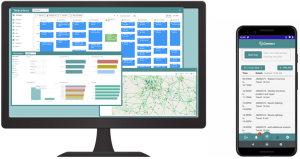
Connect Manager and Connect Mobile
Our WFM software, is a mobile and web-based workforce management tool designed to replace you teams need for spreadsheets, paper job forms and fragmented systems. Furthermore, it allows you to manage Customers → Sites/Properties → Assets → Jobs → Operatives. All in one easy, user friendly platform.
You can schedule jobs (reactive and planned), assign operatives, view job & engineer locations on maps, track job status and collect data from the field e.g. photos, signatures and attachments.
Yes, the mobile app component is called ConnectMobile. Our app allows operatives to access job details, update their status, take photos of assets, record times on site, and raise new jobs when needed. This version of the app currently supports only Android and Windows tablets. Unfortunately, we haven’t released the iOS version yet.
Yes. You can create reactive jobs quickly, and our Smart Scheduler automatically finds operatives with the right skills and their next availability.
You can also create Planned Preventative Maintenance (PPM) jobs with ease. Set the required interval, and the system creates each PPM job and adds it to the schedule. You can move individual visits to match operative availability when needed.
Planned Preventative Maintenance is the way forward, especially since the introduction of Awaab’s Law in social housing. Preventative maintenance plays a critical role in keeping tenants safe and maintaining healthy living environments. That’s why we strongly encourage organisations to use our Smart Scheduling tools in Connect, as they help teams allocate sufficient time and significantly reduce the number of reactive jobs.
Link to our Blog on Awaab’s law – https://telecetera.co.uk/blog/awaabs-law-preventative-maintenance-is-a-priority/
Link to the News – https://www.bbc.co.uk/news/articles/cpwvzxzzxrxo
We can help integrate Connect, therefore it can be fully customised and integrated within your existing business systems.
The cost is £50 per user, per month, and this price includes all functionality. Each end-user licence works across both ConnectManager and ConnectMobile, so you don’t need separate licences for each product.
You pay per active user, not per licence bundle. This means your monthly cost can go up or down depending on how many users you have in a given month, giving you flexibility as your team changes.
The Scheduler is more complex than the Mobile App, so we recommend that schedulers spend 1–2 hours per day over a 2–4 week period using the Test Server to explore the system and build familiarity. During this time, our product development team remains on hand to demonstrate features and answer any questions that arise.
While we don’t offer a formal training course, we do run one or two hands-on workshops. These sessions give your team the chance to drop in, work directly with the software, and learn alongside us in person. We actively coach users through key features and workflows to help them gain confidence quickly.
When your team first starts using Connect, this one-to-one time plays a crucial role. It helps address concerns early, reinforces best practices, and ensures everyone feels comfortable using the software effectively from the outset.
Proudly, one of our clients saved £40,000 in the first year by reducing travel alone thanks to Connect, and its improved scheduling and visibility.
Additional benefits include: real-time view of all job activity, reduced operative travel time & costs, improved scheduling & routing, controlled van stock and parts, improved cash flow by tracking time and costs to jobs and reduces the reliance on spreadsheets and paperwork.
https://telecetera.co.uk/connect-mobile-workforce-management/
If your teams still rely on paper forms and spreadsheets, you risk delays, lost data, compliance gaps, manual double entry, and poor visibility across the field.
In contrast, Connect Software provides a single source of truth across web and mobile. It synchronises data in real time between schedulers and mobile operatives, captures photos directly against jobs, and significantly reduces the need for spreadsheets and paper forms.
As a result, Connect gives you greater operational control and a stronger audit trail. In particular, it helps you meet compliance requirements with confidence while maintaining full visibility across your workforce.
Yes. First, we take the time to understand your business and its specific requirements. Next, if Connect looks like a good fit, we set up a Test Server for you.
From there, we work closely with you to explore the platform and actively test the key features your organisation needs. This hands-on approach ensures you can see how Connect supports your real-world workflows.
The Test Server remains available for up to 4 weeks. By the end of this period, it should be clear whether the software meets your needs and delivers the value you expect.
Book a quick Demo:
Here are just a few examples of the types of organisations that use Connect:
Housing associations
Facilities management
Property maintenance
HVAC
Engineering
Manufacturing
However, Connect is not limited to these sectors. In fact, any business that schedules teams to go out and complete specific jobs can use Connect to digitise and streamline its operations.
Instead of relying on complex spreadsheets and paper forms, organisations use Connect to manage work more efficiently through technology. As a result, teams gain better visibility, faster workflows, and greater operational control across the business.
Yes. We designed the software to be easy to use, which allows our clients to run multiple schedulers at the same time. For example, some teams group operatives by geography or skill set, while others coordinate jobs collaboratively.
As a result, this approach maintains constant capacity and encourages knowledge sharing within the scheduler team.
We have a New equipment feature!
Here’s what’s new:
- Admins can define items of equipment like tools, uniform and PPE that can be issued to operatives.
- Schedulers (web client users) can issue equipment to users, record returns, or record if equipment is scrapped or lost.
- Equipment levels can be viewed – can search for specific items of equipment.
- Mobile client has a view where an operative can view a list of the equipment that has been issued to them.
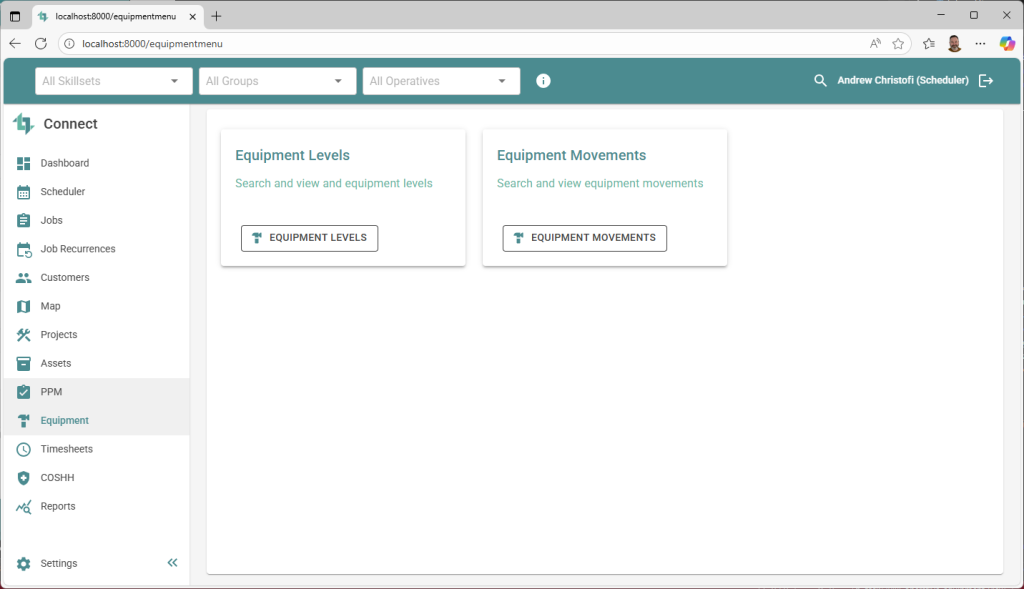
Our team has created a feature to help manage equipment effectively. This is, a crucial part of keeping workers safe and staying compliant with health and safety regulations. Therefore, for organisations with field teams, using Workforce Management (WFM) software with a built-in equipment tracking feature can significantly improve safety, productivity and compliance. Overall, this new feature helps to ensure every worker is properly equipped with the correct PPE, tools and resources before heading out to a job.
Any of your Admin users can add new users at any time. To do this, the Admin simply enters the user’s company email address, name, and selects their role. The role options include:
Admin – full privileges across the software
Scheduler – responsible for assigning jobs to operatives
Operative – access only to ConnectMobile, the mobile app
Hybrid – access to both the Scheduler and mobile app
Hybrid Admin – full access across all functions
Once added, new users are active immediately. For billing, clients are charged on the first of each month based on the total number of active licences in use.